
When Shopify-ERP Sync Issues Are Actually Symptoms of Bigger Problem
Most ecommerce teams approach Shopify-ERP inventory sync issues by troubleshooting symptoms: they reconnect apps when inventory doesn’t update, add buffer stock to prevent overselling, or hire staff to manually reconcile discrepancies. This reactive approach creates ongoing operational drag—teams spend time firefighting instead of strategizing, and sync failures keep recurring because the root cause hasn’t been addressed.
The problems with this symptom-focused approach are significant. Quick fixes often mask deeper integration architecture problems—if your ERP and Shopify weren’t integrated correctly from the start, no amount of app reconnections will make them reliable. Adding more middleware or inventory management tools creates additional integration points that can fail, compounding complexity rather than solving it. Without understanding whether the issue stems from API rate limits, data mapping errors, or fundamental platform limitations, you’re guessing at solutions rather than diagnosing systematically.
For 8 & 9-figure brands scaling across multiple channels, inventory sync failures aren’t just technical hiccups, they’re revenue killers. Overselling during Black Friday destroys customer trust. Underselling leaves money on the table. Manual corrections consume resources that should drive growth, not patch broken systems.
Understanding Why Shopify-ERP Inventory Sync Fails
Most sync problems aren’t bugs, they’re architectural limitations of how systems were connected in the first place. Shopify supports event-based updates (via webhooks) as well as polling-based integrations, depending on how the integration is implemented, meaning inventory updates are typically triggered by events like orders, fulfillments, or API updates from external systems. ERP systems often have their own inventory management logic and update cycles that don’t naturally align with Shopify’s event triggers.
Integration middleware adds latency between when inventory changes in the ERP and when Shopify reflects that change. During high-volume periods like Black Friday, API rate limits imposed by Shopify can slow or throttle updates, requiring proper queuing and retry logic in the integration layer, creating the exact conditions where overselling occurs.
We saw a related version of this while migrating a seed and flower bulb brand to Shopify Plus and integrating a new ERP system. Because the catalog included thousands of season-sensitive products, inventory accuracy could not be treated as a simple stock count. Product availability also depended on attributes like seasonality, shipment timing, and product readiness.
As part of the migration, we helped structure product data and season-aware product pages so Shopify could communicate availability and delivery expectations more clearly while the ERP integration automated inventory and fulfillment workflows.
The lesson is important for Shopify-ERP sync planning: inventory is not always just “quantity on hand.” For horticulture brands, sellable inventory may depend on season, timing, location, and fulfillment constraints. If those definitions are not modeled correctly across systems, even a technically functional sync can create confusion.
Multi-channel selling significantly increases complexity. Inventory must sync across Shopify, Amazon, eBay, Etsy, and the ERP simultaneously. Each with different sync speeds and methods. A sale on Amazon might not update Shopify inventory quickly enough to prevent overselling the same item through your direct-to-consumer channel.
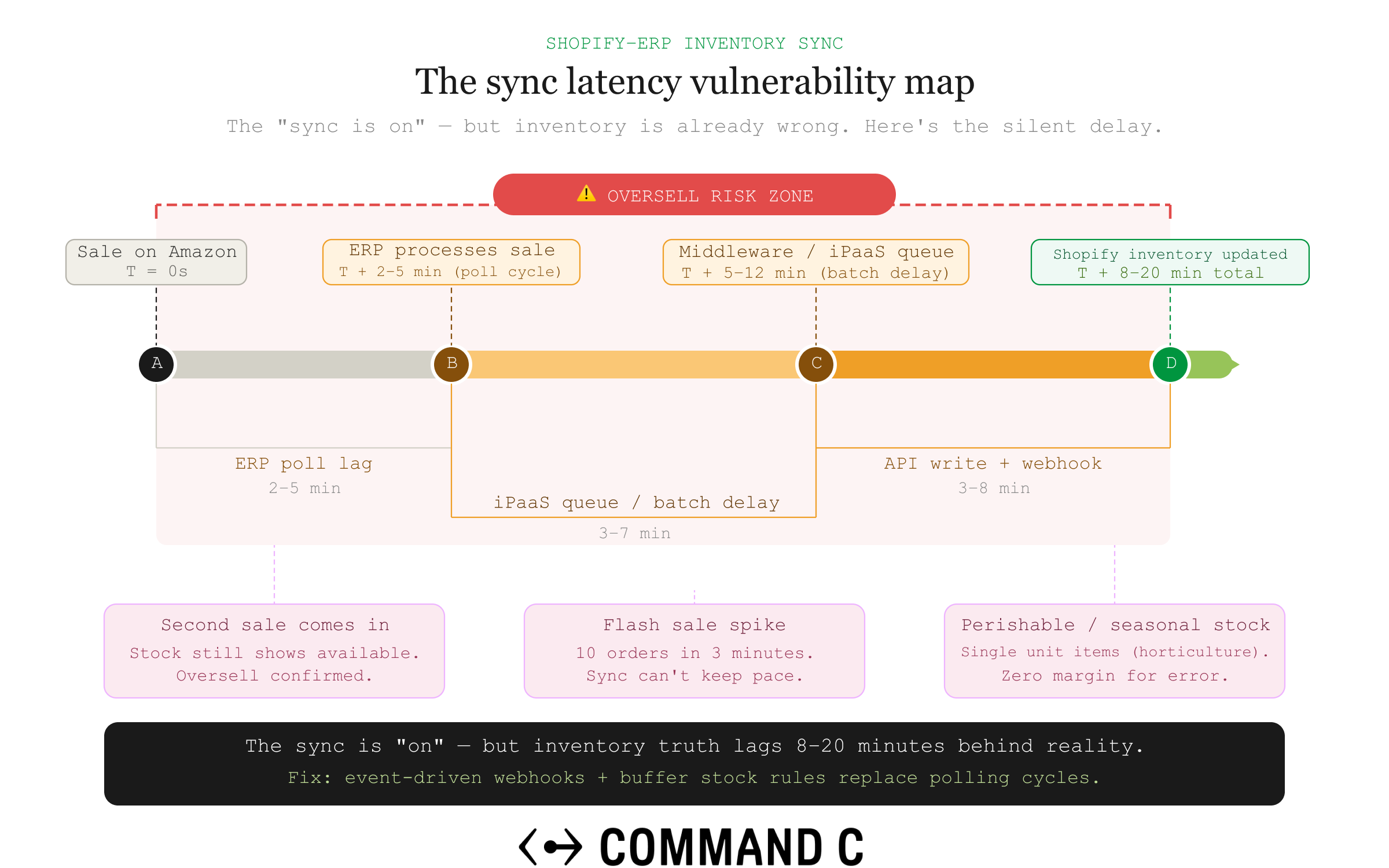
Consider a horticulture brand selling live plants across multiple channels. A nursery might sell the same Monstera plant through Shopify, Amazon, and local pickup from multiple greenhouse locations. Inventory isn’t just a static number, it changes based on plant health, seasonal availability, and location-specific stock. If a customer purchases the last healthy Monstera from a greenhouse location via Amazon, but that update is delayed before syncing to Shopify, the store can oversell a plant that no longer exists in sellable condition. At the same time, the ERP may still show total inventory across all locations without accounting for plant quality or quarantine status. What looks like a “sync bug” is actually a mismatch between how inventory is defined and how systems communicate it.
The reality is that many “sync failures” are the result of architectural limitations or design tradeoffs rather than simple bugs. The design is just inadequate for enterprise-scale operations.
Diagnosing Where Your Sync Problem Is Actually Occurring
Before implementing fixes, you need to identify whether the problem is Shopify-side, ERP-side, or in the integration layer. Most troubleshooting guides skip this diagnostic step, leading teams to waste time fixing the wrong component.
Check Shopify’s inventory adjustment history on product pages to see if updates are reaching Shopify at all. If changes appear but with delays, the issue is sync timing rather than connectivity. Review your ERP’s outbound API logs or sync reports to confirm it’s successfully sending inventory updates. If the ERP shows successful sends but Shopify doesn’t reflect them, the problem is in the integration layer.
If your integration is designed to be bi-directional, test whether manual inventory changes in Shopify sync back to your ERP. If they don’t, you have a bi-directional sync configuration problem that will create ongoing conflicts. Monitor sync performance during peak order periods versus slow periods—if sync works fine normally but fails during high volume, you’re hitting API rate limits or processing capacity issues.
Compare inventory accuracy across different product categories or SKUs. If only certain products desync, the issue may be data mapping errors or SKU mismatches between systems. Verify that inventory tracking is enabled on all Shopify products and variants—this is the most common oversight and easiest to fix.
Quick Fixes for Common Shopify-ERP Sync Issues
While architectural problems require deeper solutions, some sync issues can be resolved with immediate tactical fixes. These address the most common configuration errors that break sync for otherwise properly integrated systems.
Enable inventory tracking on all products in Shopify by going to Products, selecting each product, and checking ‘Track quantity’ in the Inventory section. Without this enabled, Shopify won’t decrement stock when orders process, making sync impossible regardless of your ERP setup.
Reconnecting your ERP integration app can help refresh authentication in some cases, but persistent issues may require reviewing API permissions or token scopes. This often resolves connectivity issues that developed over time as tokens expired or permissions changed. Trigger manual sync from your integration app’s dashboard to force an immediate inventory update and confirm the connection is working.
Verify that SKUs match exactly between Shopify and your ERP. Even minor differences like hyphens, spaces, or capitalization will break sync for those products. Check that products are assigned to the correct inventory locations in Shopify under Settings > Locations, and ensure your ERP is syncing to those same locations.
Review your integration app’s error logs for specific failure messages. Many apps show ‘last successful sync’ timestamps and error details that point directly to the problem. Adjust sync frequency carefully based on API limits and system capacity (higher frequency isn’t always better) many default to hourly when 15-minute or real-time options exist.
When Quick Fixes Aren’t Enough: Identifying Architectural Problems
If sync issues recur frequently despite fixes, your integration architecture is fundamentally flawed. Reactive troubleshooting becomes an ongoing operational drain that diverts resources from growth initiatives. This is where most ecommerce teams get stuck—they know something is wrong, but they can’t tell if the foundation is salvageable or needs rebuilding.
When multiple integration apps manage inventory simultaneously (one for Amazon, another for your ERP, another for fulfillment) they can override each other’s updates if responsibilities aren’t clearly defined, creating difficult-to-debug conflicts. Legacy ERP systems with limited API capabilities may not support real-time webhooks, forcing you into batch syncing that will always have delays regardless of configuration.
Poor data architecture where product data isn’t normalized between systems means inventory updates work for some SKUs but fail for others, requiring constant manual corrections. If your integration was built quickly during a migration or by a team that’s no longer available, the lack of documentation and error handling means every new issue requires starting diagnosis from scratch.
Integration tools that work at lower volumes can start to struggle as order volume increases significantly. Scalability wasn’t designed in from the start, and now you’re hitting breaking points that can’t be patched. When your team spends more time manually reconciling inventory discrepancies than they would spend rebuilding the integration properly, you’ve crossed the threshold where architectural change makes financial sense.
How Command C Solves Shopify-ERP Sync Issues Permanently
Our Strategic Technical Roadmap process diagnoses whether sync issues stem from poor integration architecture, incompatible systems, or platform limitations—preventing you from investing in fixes that won’t actually solve the root problem. We evaluate whether your ERP system’s API capabilities can support real-time sync at your current and projected order volumes, or if platform limitations mean you need different integration methods or even a different ERP.
Our Enterprise-Grade Migrations & Builds service can rebuild fragile ERP integrations on solid technical foundations with proper error handling, real-time sync capabilities, and scalable architecture designed for your growth trajectory. We implement proper data mapping and normalization between Shopify and your ERP so inventory updates work reliably for all SKUs, not just the ones that happen to match perfectly.
Long-Term Development Partnerships provide ongoing monitoring of your ERP-Shopify connection, catching sync degradation before it causes Black Friday overselling disasters. We act as an extension of your team, not a vendor that disappears after implementation.
Our Stability-to-Scale Process specifically helps brands in the ‘Challenge’ phase who are dealing with fragile integrations and technical debt, first stabilizing the sync infrastructure then optimizing for performance as you scale. We design integrations with redundancy and fallback mechanisms so if one sync method fails, backup systems maintain inventory accuracy rather than letting discrepancies compound.
Our diagnosis-first approach means we evaluate whether your current integration can be salvaged with fixes or needs complete rebuilding. Most agencies just implement what you ask for without questioning if it’s the right solution.
Choosing the Right Integration Method for Your Scale
Native ERP connectors built by the ERP vendor for Shopify are easiest to set up but often lack customization for complex workflows and may not sync as frequently as needed for high-volume stores. Third-party integration apps from the Shopify App Store work well for straightforward sync needs but can create conflicts when you need multiple apps managing different aspects of inventory.
Custom API integrations built specifically for your Shopify-ERP connection offer the most control and reliability but require significant development expertise and ongoing maintenance. iPaaS solutions like Celigo or Boomi act as middleware between systems and can handle complex data transformations, but add another layer that can fail or slow down sync.
For 8 & 9-figure brands selling across multiple channels, you typically need more than native connectors can provide. Custom or iPaaS solutions become necessary to handle the data complexity. Webhook-based integrations push near real-time updates from Shopify to your ERP the moment inventory changes, providing faster sync than polling-based integrations that check for updates on a schedule.
The right integration method depends on your order volume, number of SKUs, multichannel complexity, and how much customization your business processes require. There’s no one-size-fits-all solution, which is why Command C’s diagnostic process evaluates your specific technical requirements before recommending architecture changes.
Preventing Sync Issues During Peak Seasons
API rate limits become critical during peak periods when order volume can spike significantly during peak periods. Integrations that work fine in August can fail spectacularly on Black Friday. Implement safety stock buffers for products sold across multiple channels, setting available inventory to 90% of actual stock to create a cushion against sync delays.
Test your integration under simulated load using controlled testing or lower-risk production scenarios where possible to identify where bottlenecks occur. Configure queue-based processing in your integration so if Shopify’s API rate limits slow sync, updates queue rather than fail, they’ll process once capacity opens up.
Monitor sync lag metrics during peak periods in real-time so you can catch slowdowns before they cause overselling, rather than discovering problems through customer complaints. Have a manual override process documented and tested for critical sync failures, if automation breaks, your team needs a fast way to manually update inventory across channels.
Increase sync frequency starting a week before peak periods and keep it elevated through the season. Don’t wait until Black Friday to discover your hourly sync can’t keep up with demand.
Multi-Location and Warehouse Inventory Sync Considerations
Shopify’s multi-location inventory requires each product to be enabled at specific locations, and sync must specify which location inventory changed—missing location assignments break sync entirely. If you transfer inventory between warehouses using Shopify’s transfer feature, incomplete transfers tie up inventory and create discrepancies until receiving is confirmed.
3PL fulfillment centers often have their own inventory management systems that need to sync with both your ERP and Shopify, creating three-way sync complexity where any delay cascades. Location-based inventory routing means orders must pull from the correct warehouse in both Shopify and your ERP. Mismatches cause orders to fail or ship from wrong locations.
Some ERPs struggle with Shopify’s location concept, trying to sync total inventory across all warehouses rather than per-location quantities, making accurate sync impossible. Real-time sync becomes even more critical with multiple locations because inventory moves between locations frequently, and delays compound the chance of overselling from a specific warehouse.
Our integration architecture ensures location mapping between Shopify and your ERP is configured correctly from the start, preventing the location-mismatch issues that cause many sync failures.
When Tools Aren’t Enough
Integration apps work well when your ERP has a robust API and your business processes fit standard sync patterns, but they struggle with complex custom workflows. Apps can conflict when multiple tools try to manage inventory simultaneously, one app’s update can overwrite another’s, creating worse sync problems than having no app at all.
For enterprise-scale operations with custom ERP configurations, third-party apps often can’t handle the data transformation complexity, and custom API integration becomes necessary. Command C evaluates whether off-the-shelf integration apps can meet your needs or if your scale and complexity require custom-built solutions. Most agencies just install an app and hope it works.
The Strategic Question
The decision facing ecommerce leaders isn’t which sync app to try next. It’s whether your current integration architecture can reliably support your growth, or if recurring sync issues indicate deeper problems that require rebuilding rather than patching.
Inventory sync problems are rarely isolated technical issues—they’re symptoms of integration debt that accumulates when systems are connected hastily or without considering long-term scale. The brands that solve this permanently treat sync issues as architectural problems, not operational nuisances.
If your team is spending more time managing inventory discrepancies than driving growth, it’s time to diagnose what’s really broken. Our Strategic Technical Roadmap process determines whether your Shopify-ERP integration can be fixed or needs rebuilding, before the next peak season exposes the cracks.