
Enterprise Shopify Plus Migration Checklist: Strategic Planning for High-Stakes Transitions
Most Shopify Plus migration checklists treat the process like a simple platform switch: export your data, import it to Shopify, and flip the switch. For a standard merchant, that’s fine. But for an 8-figure brand with ERP integrations and complex data structures, following a generic checklist is a recipe for disaster.
We’ve seen brands make critical mistakes that cost months of recovery time:
- Treating migration as a technical task rather than a strategic business transition
- Following generic checklists that miss enterprise-level complexity like ERP integrations and custom data structures
- Underestimating the architectural planning needed to avoid post-launch technical debt
- Rushing through pre-migration audits and discovering critical gaps only after going live
- Failing to establish clear success metrics beyond “the site is working”
This isn’t a list of “how to import products.” This is a strategic framework designed to protect your revenue, preserve your SEO, and ensure your tech stack scales. The approach turns migration from a risky technical project into a strategic foundation for scalable growth.
Pre-Migration Strategic Assessment: Building Your Foundation
Most migration failures stem from inadequate discovery, not technical execution errors. Before touching any data or making platform decisions, you need comprehensive visibility into your current architecture and future requirements.
- Audit your current tech stack comprehensively. Document every integration that keeps your business running: ERP connections, 3PL workflows, accounting system data feeds, marketing automation triggers, and customer service tools. Map how data flows between these systems and identify which connections are business-critical vs. nice-to-have.
- Evaluate your product catalog complexity against Shopify Plus capabilities. If you’re running complex variant structures, custom pricing rules, or product configurators, you need to understand how Shopify’s architecture will handle these requirements. Some functionality may need to be rebuilt using Shopify’s metafield system or custom apps.
- Establish clear success metrics beyond basic functionality. Your migration should improve operational efficiency, not just replicate what you have today. Define specific goals for site performance, conversion rates, team productivity, and integration reliability. These metrics become your roadmap for post-launch optimization.
- Document integration requirements with mission-critical systems. Your OMS, accounting software, and fulfillment workflows must continue operating seamlessly. Identify API limitations, data sync requirements, and backup procedures if integrations fail during the transition period.
This strategic assessment phase dramatically improves platform selection decisions and reduces post-launch technical debt by diagnosing architectural requirements upfront rather than discovering limitations after launch.
Data Migration Strategy: Beyond Products and Customers
Standard CSV imports work for basic catalogs, but enterprise brands need custom migration strategies for complex data relationships and business-critical information that generic tools can’t handle.
- The “Delta” Migration Strategy (The Critical Gap). In a live environment, data doesn’t stop moving. You cannot simply “shut down” for a week to migrate. Your strategy must include a “Data Freeze” date for the bulk import, followed by a final “Delta Migration” just minutes before launch to sync only the customers and orders created during the freeze period. This ensures zero data loss during the cutover.
- Gift cards and store credits require the most careful planning. Gift cards and credits need explicit migration decisions (balance accuracy, code preservation, redemption behavior, expiration rules, and reporting), plus a customer communication plan.
- Customer account migration involves more than contact details. Loyalty points, subscription status, custom pricing tiers, and B2B account hierarchies must be preserved to maintain customer relationships. Test the login experience thoroughly. Password resets and account access issues create immediate customer service problems. Assume passwords cannot be migrated and plan an activation or reset workflow with clear customer communication.
- Preserve sufficient historical order data. Preserve sufficient order history for support and reporting, either by importing a meaningful window into Shopify or by providing fast access to legacy history in a support friendly system.
- Custom metafields and product relationships need architectural rebuilding. Don’t just import data, redesign how information is structured using Shopify’s architecture. Product bundles, automated workflows, and custom fields should be rebuilt for better performance rather than directly ported from your old system.
Technical Architecture Planning: Building for Scale
Your migration approach depends on your specific requirements for design control, timeline, and budget. Understanding these options upfront prevents costly changes mid-project.
- Choose between optimized theme builds vs. custom development. Optimized theme builds using carefully selected pre-existing themes offer faster timelines and lower costs for most enterprise migrations. Custom development provides complete design control but requires longer timelines and higher investment. Most 8-figure brands find optimized builds meet their requirements while leaving budget for post-launch optimization.
- Consolidate apps to improve performance and reduce costs. Many Shopify 2.0 features can replace multiple legacy apps, reducing monthly subscription costs and eliminating potential integration conflicts. Audit your current app stack and identify consolidation opportunities before migration begins.
- Plan integration architecture around Shopify’s limitations. API rate limits, webhook reliability, and data sync frequency affect how your ERP and 3PL systems communicate with Shopify. Design integration workflows that account for these constraints rather than assuming direct data replication from your previous platform.
- Optimize for enterprise-level traffic and performance. CDN configuration, image optimization, and checkout flow optimization become critical at scale. Plan these performance improvements into your migration rather than addressing them post-launch when traffic issues affect revenue.
- Consider headless commerce requirements early. If your customer experience requirements exceed traditional Shopify theme capabilities (complex product configurators, extensive personalization, or unique checkout flows) evaluate headless solutions during planning, not after discovering limitations post-launch. Shopify Plus supports deep checkout extensibility, but fully bespoke checkout experiences still have platform constraints.
SEO Preservation & URL Structure
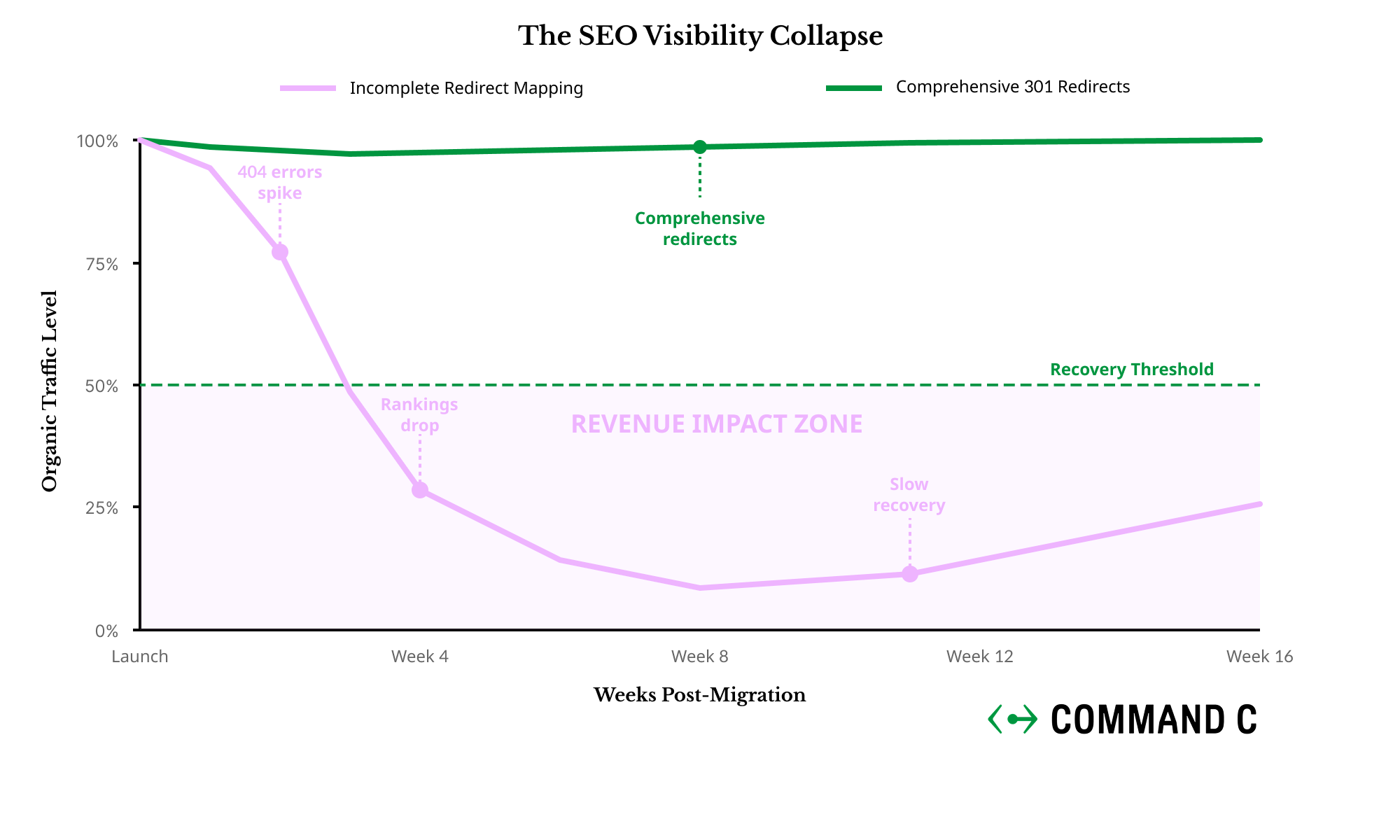
Traffic loss during migration can immediately impact revenue and take months to recover. SEO preservation requires systematic planning for every page that currently drives organic traffic or serves as a paid campaign landing page.
- The “Staging Trap”: Block Indexing Immediately. Keep staging out of the index (password protect it, add noindex, and verify in Search Console) so Google cannot crawl or surface unfinished pages. If Google indexes your unfinished site before launch, you risk duplicate content penalties that can tank your rankings before you even go live.
- Create comprehensive 301 redirects for all traffic-driving pages. Beyond product and collection pages, map redirects for filtered collection pages, blog category tags, legacy landing pages, and any URLs that appear in your Google Analytics as traffic sources. Missing redirects for seemingly minor pages can eliminate valuable long-tail traffic.
- Implement wildcard redirects for systematic URL pattern changes. If URL patterns change, plan for redirect scaling (bulk redirects, API generated redirects, or edge rules where appropriate).
- Preserve crawl budget by maintaining site architecture. Search engines allocate limited crawling resources to your site. Dramatic changes in internal linking, site structure, or page hierarchy can reduce how effectively search engines discover and index your content. Maintain similar navigation and internal linking patterns where possible.
- Monitor search console data immediately post-launch. Set up alerts for crawl errors, indexing issues, and ranking drops. The first two weeks after migration are critical for identifying and fixing SEO issues before they significantly impact organic traffic.
Risk Mitigation and Testing Framework
Enterprise migrations require comprehensive testing under realistic conditions to prevent revenue-affecting issues during peak traffic periods.
- Build your new store in parallel to minimize downtime. Construct and test your Shopify Plus store while your current site remains live and processing orders. This approach allows thorough testing without affecting current revenue and enables faster cutover when you’re ready to launch.
- Test payment processing under real conditions. Process actual test transactions through your payment gateway using your final theme, app configuration, and checkout customizations. Payment failures during peak traffic periods can immediately impact revenue and customer trust.
- Conduct load testing with your actual configuration. Generic performance tests don’t account for your specific apps, customizations, and traffic patterns. Performance test what you can control (theme pages, app heavy templates, integration throughput), and use monitoring to catch real world bottlenecks immediately post launch.
- Prepare customer communication and support protocols. Plan when to notify customers about changes, how to explain new features or processes, and what to do if issues arise. Train your customer service team on new admin interfaces and common migration-related questions before launch.
- Establish rollback procedures and emergency protocols. If critical issues surface post-launch, you need predefined procedures for reverting to your previous system or implementing emergency fixes. Document these procedures and ensure relevant team members can execute them quickly.
Post-Launch Stabilization and Optimization
Migration success is measured over months, not days. The first 30 days focus on stability, while the following 90 days should deliver the operational and performance improvements that justified the migration investment.
- Monitor performance metrics and resolve edge cases. Track site speed, conversion rates, integration reliability, and customer service ticket volume. Address any performance regressions immediately—customers notice site slowdowns and checkout issues within days of launch.
- Implement conversion optimization opportunities. Your new platform likely offers features your previous system couldn’t support. A/B test checkout flows, mobile experience improvements, and page layouts to capture the conversion gains that justify migration costs.
- Establish analytics accuracy and attribution modeling. Verify that your analytics tracking captures accurate conversion data and properly attributes sales across channels. Analytics gaps can affect marketing decisions and make it difficult to measure migration success.
- Train teams on productivity improvements. Shopify’s admin interface and automation features should improve team efficiency. Invest time in training staff on new workflows, bulk editing capabilities, and admin shortcuts that reduce manual work.
When to Partner vs. DIY Your Migration
Migration complexity scales dramatically with business size and technical requirements. Understanding when you need specialized expertise prevents costly mistakes and extended project timelines.
- Small to medium catalogs with straightforward integrations can often handle basic migrations using Shopify’s native tools and established apps. If your business processes are standard and your current integrations are simple, internal teams can manage the transition with careful planning.
- Enterprise migrations require specialized expertise when you’re dealing with ERP integrations, custom functionality, complex product configurators, multi-location inventory, or custom B2B workflows. The cost of professional migration support is typically lower than the revenue impact of extended downtime or post-launch issues.
Signs you need professional migration support:
- Revenue over $10M annually with complex operational requirements
- Custom pricing rules, product configurators, or B2B functionality
- Multiple system integrations that are business-critical
- Previous migration attempts that revealed unexpected complexity
- Tight timeline requirements that can’t accommodate learning curves
Professional migration partnerships provide ongoing value beyond the initial launch. Strategic guidance, development capacity for optimization, and technical expertise become valuable assets for continued growth rather than one-time migration costs.
Ready to plan your migration strategically?
Most brands benefit from professional guidance even if they handle execution internally. Book a Strategic Technical Roadmap consultation to diagnose your specific requirements and develop a migration plan that protects your revenue while positioning your tech stack for scale.