
The 8 Figure Revenue Leak: Why Liquid Render Time is Capping Your Scale
At the 8 figure mark, your tech stack is either a multiplier or a mediocrity tax. If your growth has plateaued despite increasing ad spend, the bottleneck isn’t your creative, it’s your server. While most teams treat site speed as a “developer ticket,” Liquid render time is actually a growth bottleneck. It’s the silent server-side delay that inflates your CAC and erodes your ROAS before a single pixel even hits the customer’s screen. While tactics might shave off milliseconds, they often miss the deeper architectural problems causing slow rendering in the first place.
The real issue isn’t just “messy code”, it’s compounding technical interest. Years of layering apps, legacy customizations, and “quick-fix” patches have created an architectural ceiling. For a high-volume store, this isn’t just a nuisance; it’s a direct hit to your customer lifetime value (LTV) and site stability during high-stakes traffic spikes.
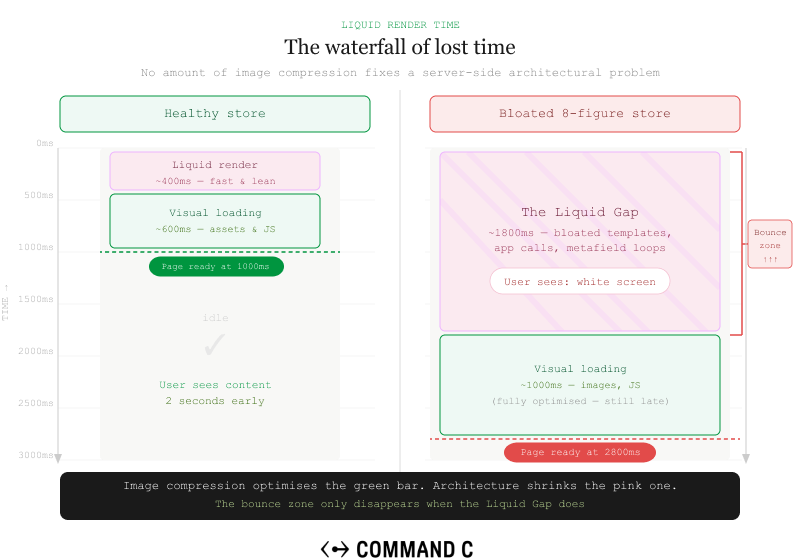
For 8 & 9-figure ecommerce operations, Liquid render delays are not just technical nuisances, they’re direct threats to revenue. Multiple industry studies have shown that even small page speed delays can reduce conversions, especially at scale. When your store processes thousands of orders daily, every millisecond of server-side delay compounds into measurable losses in customer lifetime value.
We solve Liquid render time issues by diagnosing the root architectural causes first, then implementing systematic optimizations that create lasting performance improvements. This approach doesn’t just speed up your site, it builds a foundation that prevents performance degradation as your store scales.
Understanding Liquid Render Time: What’s Actually Causing the Delay
Liquid render time is the server-side processing delay that occurs before any HTML reaches the browser. Unlike client-side optimizations that happen after the page loads, Liquid rendering can significantly influence metrics like LCP and FCP by delaying when the browser receives initial HTML. This makes it one of the most critical performance factors for both user experience and SEO rankings.
Most render delays stem from inefficient Liquid loops, expensive object access patterns, and poor code architecture. When developers patch performance issues without understanding the underlying template structure, they create fragile solutions that break under traffic load.
The difference between render delay and load delay is crucial: render happens server-side before browsers start processing, making it one important part of overall performance. A slow-loading image might delay visual completion, but slow Liquid rendering blocks the entire page from starting to load.
Complex conditional logic and deeply nested snippets can compound processing time significantly. A template that performs acceptably during low-traffic periods can suddenly become a bottleneck during peak sales events or marketing campaigns. This is why many stores experience performance degradation precisely when they can least afford it.
Understanding flame graphs from Shopify Theme Inspector reveals exactly where bottlenecks occur in your template hierarchy. Instead of guessing which code sections are causing delays, flame graphs show where render time is being spent across template sections, snippets, and Liquid operations. This diagnostic data is what separates systematic optimization from trial-and-error fixes.
How to Diagnose Liquid Performance Issues: Tools and Methodology
You wouldn’t scale ad spend without attribution data; you shouldn’t optimize your store without a Flame Graph. Think of this as an MRI for your server. It moves the conversation from “the site feels slow” to “Snippet X is high-jacking 400ms of every session.” This visibility allows your team to make surgical, ROI-positive fixes rather than billing hours for trial-and-error.
The Shopify Theme Inspector Chrome extension provides flame graph analysis showing exact render times for each template section and snippet. This tool reveals which specific Liquid operations consume the most processing time, allowing you to prioritize fixes based on actual impact rather than perceived problems.
PageSpeed Insights and Core Web Vitals data reveal customer impact, but Theme Inspector shows the Liquid-specific causes behind poor scores. While Google’s tools identify that your site is slow, Theme Inspector pinpoints whether the delay comes from product loops, collection processing, or complex conditional logic.
Time to First Byte (TTFB) analysis distinguishes server-side Liquid issues from client-side optimization needs. Elevated TTFB can indicate server-side bottlenecks, including Liquid rendering, app processing, or infrastructure latency. This distinction matters because server-side fixes require different approaches than client-side improvements.
Real User Monitoring (RUM) data through tools like SpeedCurve or Datadog identifies which pages and device types suffer most from render delays. Mobile devices often show different performance patterns than desktop, and product pages frequently have different optimization needs than collection or content pages.
Our diagnostic process maps performance gaps to specific business impact rather than just technical metrics. We analyze which render delays affect your highest-converting pages, your most profitable customer segments, and your peak traffic periods. This business-focused approach ensures optimization efforts target the improvements that will deliver measurable ROI.
| Metric | The “Everything is Fine” Level | The “8-Figure Leak” Level |
|---|---|---|
| TTFB (Time to First Byte) | Under 200ms | 600ms+ (Indicates Liquid Bloat) |
| Flame Graph Peaks | Flat/Consistent | “Skyscrapers” in specific snippets |
| App Dependencies | Audited/Lean | 20+ active apps “fighting” in Liquid |
Optimizing Liquid Loops and Collections
Unlimited loops through large collections can add seconds to render time and should always use limits and pagination to control processing load. A common mistake is looping through entire product collections when only the first few items will be displayed. This forces Shopify to process hundreds of products just to show a dozen.
Pre-filtering collections with tools like where and sort can simplify loop logic and reduce repeated conditional checks when used appropriately. Instead of filtering products within the loop, apply filters at the collection level so Liquid only processes the relevant subset of data.
{% assign featured_products = collections.all.products | where: 'tags', 'featured' | limit: 6 %}
{% for product in featured_products %}
  <!-- Process only pre-filtered products -->
{% endfor %}
Avoid nested loops accessing product attributes repeatedly. Instead, capture computed values once and reuse them throughout the template. This approach can reduce repeated processing and improve maintainability.
Replace multiple loops over the same data with single loops that capture all needed output. Rather than iterating through products once for prices, again for availability, and again for images, design loops that collect all necessary information in a single pass.
Paginate collections early in the template rather than processing entire datasets that won’t be displayed. Many themes load complete collections and then hide products with CSS, forcing unnecessary server-side processing. Proper pagination ensures Liquid only processes the products that will actually be shown to customers.
Liquid Code Architecture: Snippets, Sections, and Scope Management
Using render instead of deprecated include tags creates isolated variable scope and usually leads to cleaner, more predictable templates. The render tag prevents variable pollution between snippets and makes debugging significantly easier when performance issues arise.
Performance isn’t just about millisecond wins; it’s about Agility. A modular Liquid architecture (using render over include) creates a “plug-and-play” environment. This means your marketing team can launch new landing pages and experiment with A/B tests without worrying that a new section will break the global site speed or require a week of “bug fixing.” Explicit parameters create cleaner, more maintainable code that’s easier to optimize.
Strategic use of capture tags stores computed output for reuse, eliminating duplicate processing of expensive operations. If your template needs the same calculated value in multiple places, capture it once and reference the stored result rather than recalculating repeatedly.
{% capture product_discount_percentage %}
  {% if product.compare_at_price > product.price %}
    {{ product.compare_at_price | minus: product.price | times: 100 | divided_by: product.compare_at_price | round }}
  {% endif %}
{% endcapture %}
Client-side lazy loading strategies for non-critical sections can improve perceived performance and initial paint metrics. Not every section needs to render immediately when the page loads. Strategic deferral of below-the-fold content can dramatically improve perceived performance.
Proper template hierarchy reduces code duplication and creates maintainable performance optimizations. When the same Liquid logic appears in multiple templates, extracting it into reusable snippets ensures optimizations benefit the entire site rather than just individual pages.
Advanced Performance Techniques for Enterprise Stores
Conditional section loading based on user behavior and device type prevents unnecessary processing on mobile devices. Mobile users often interact with simplified interfaces, so rendering desktop-specific functionality wastes processing power and slows the experience where it matters most.
Storing precomputed values in metafields can reduce repeated runtime calculations for frequently used data. Complex pricing calculations, shipping estimates, or availability checks can be pre-computed and stored rather than calculated on every page load.
Intelligent use of Liquid objects can reduce unnecessary processing and expensive data access patterns during template rendering. Understanding how Shopify’s Liquid objects work under the hood allows developers to structure templates that require fewer database lookups.
Performance monitoring at scale requires different approaches than basic PageSpeed testing. Eight-figure stores need to track performance across customer segments, device types, geographic regions, and traffic patterns. Average metrics hide the performance variations that affect different customer experiences.
Best Ways to Measure and Maintain Liquid Performance
Establishing baseline metrics before optimization enables measurement of actual performance improvements and business impact. Without clear before-and-after data, it’s impossible to determine whether optimization efforts are delivering ROI or just creating busy work.
Core Web Vitals tracking specific to Liquid changes distinguishes rendering improvements from other optimization efforts. When multiple performance initiatives run simultaneously, isolated measurement reveals which changes drive the biggest improvements.
Regular performance audits catch architectural debt before it compounds into major render delays. Like financial debt, technical debt accumulates interest over time. Small inefficiencies become major bottlenecks as traffic grows and functionality expands.
A/B testing performance optimizations validates that faster render times translate to improved conversion rates and user engagement. Technical improvements should drive business improvements. If faster rendering doesn’t improve customer behavior, the optimization strategy needs adjustment.
Long-term performance maintenance requires ongoing code reviews and architectural planning, not just one-time fixes. As your store evolves—adding products, launching campaigns, integrating new tools—the Liquid codebase must evolve strategically to maintain performance standards.
When to Consider Professional Liquid Optimization
Custom theme architectures with years of accumulated modifications often require systematic refactoring beyond individual optimizations. When multiple developers have contributed code over time without architectural oversight, the template structure becomes fragile and difficult to optimize piecemeal.
High-traffic stores processing millions in annual revenue face different performance challenges that generic optimization guides don’t address adequately. Enterprise-level optimization requires understanding how Shopify’s infrastructure behaves under load and how to architect templates for scalability.
Complex integration requirements with ERP, PIM, and fulfillment systems create render bottlenecks that need architectural solutions. When Liquid templates must process data from multiple external systems, optimization becomes a systems integration challenge rather than a simple coding exercise.
When performance issues stem from deeper technical debt, surface-level Liquid fixes provide temporary relief but don’t prevent recurring problems. If your development team spends significant time firefighting performance issues, the underlying architecture likely needs systematic attention.
The Architecture Behind Sustainable Performance
Liquid render time optimization is not just about making code run faster. It’s about building an architecture that maintains performance as your business scales. The most successful eight-figure stores treat performance as an architectural principle, not a reactive fix.
We’ve seen how proper Liquid optimization becomes a competitive advantage. When your site loads faster than competitors, converts better under traffic load, and provides consistent performance across devices, technology becomes a growth lever rather than a bottleneck.
The difference between tactical fixes and strategic optimization is planning. Tactical fixes address immediate symptoms. Strategic optimization creates a foundation that prevents performance degradation as your business grows, your catalog expands, and your customer base increases.
If your Liquid render times are slowing customer experiences, driving up bounce rates, or creating operational inefficiencies, the issue likely extends beyond individual code optimizations. Our Strategic Technical Roadmap process can help you understand whether Liquid optimization alone will solve your performance challenges or if broader architectural considerations are needed.
Ready to turn performance into a competitive advantage? Connect with our team to discuss how systematic Liquid optimization fits into your growth strategy.